On Drupal...
Posted 2 days, 3 hours ago in GeneralSeriously, don't.
Seriously, don't.
I found a way to be useful to my design classes for once since, well, I'm not a very good designer playing designer at a design school. I'm working on it but still there is a huge gap between me and most the other students. Anyway, in my Type III class we're working on a collaborative installation at a local coffee shop called Rowsters.
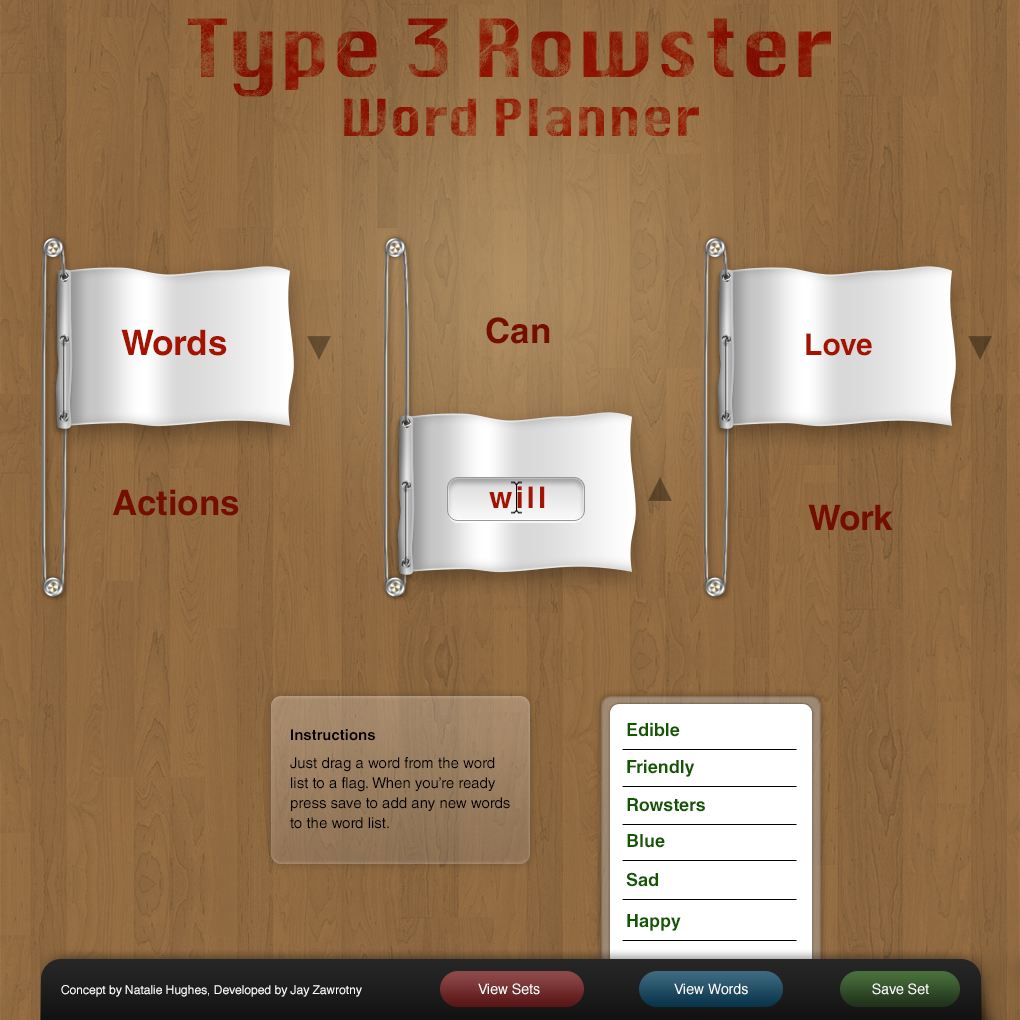
We each had to come up with an idea and pitch it to the rest of the class the one I came up with offered little value and would have taken a long time. So we're going with another student's that is much stronger in message and easier to produce. We're going to setup 3 flags on pulleys and there will be a word at the top, bottom, and on the flag. When a flag is raised or lowered it creates a new sentence by the 3 flags or the 6 words not covered by flags.
Anyway I thought it would be cool to make a interactive version of this to help us visualize it and along with helping the rest of the class brainstorm good words to really push the concept as far as we can take it.

To build this I'm venturing into relatively new territory working with node.js, MongoDB, and the Express framework.
Anyway I just finished planning the development resources needed to complete the project. Glad to find it's not that complicated :D
I've posted my MVC Module Table which is what I've used to determine what is needed to build the system.
The models handle the data, for instance a WordSet model would represent a single row in the database that contains the 9 words, the user's IP address, the time of creation of that set of words, and the status.
Luckily there's only one view which is the image attached, the homepage and main interface. Express.js uses Jade for templates which is more or less node's HAML which I've gained experience with using SASS. It's clean, well organized, and easy to read.
Controllers control the application behavior in response to events. For instance when the user hits the save set button it will send a post request to the WordSet controller that will sanitize them and add them into the database then send a response to the browser for it to interpret like the set to add to the user's list of available sets and the words they can use.
I expect this project to be challenging but not impossible. Luckily I do have some contacts familiar with some of those technologies so if it looks like it's not getting done by Tuesday I can inquire their help. The digital design that I made is strong enough where I think it could mean something having someone's name in the credits.
A reusable, JavaScript class to animate a bubble formed underwater floating up to the surface. I also have a real-example work-in-progress of it at http://ed.aetkinzstudios.com.
I'm quite happy with the result myself, going forward that's definitely the way to make animated user-interface elements. I think I may create a tooltip like that especially since making a jQuery tooltip plugin means that I'd be pretty much tying the tooltip to a specific method of triggering. Like on a certain element's hover or something, and sure I could open it up by using callbacks and settings I think that will always change project to project. So what I want to do is create a reusable tooltip object with a constructor so I can write var tooltop = new Tooltip("message", x, y); inside of any jQuery or other framework event handler that I want.
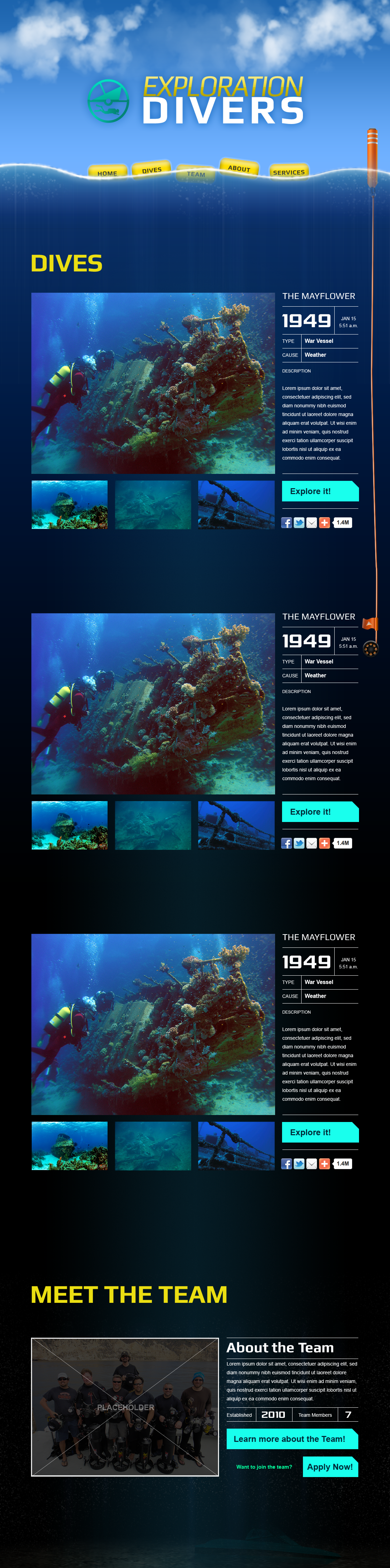
Here's the finished mockup for exploration divers. It's a diving website for my boss at Aetkinz I'm also working on in a class of mine. The goal is to really make a fun diving experience that really makes the site and content fun, of course the key is making really good content so that's been a big part of it so far.
So I'm going to start a small personal project. It's a time management web app to help me keep better track of time spent working. The big pull-in will be how I'm choosing to manage it.
Typically you have to create the categories, the projects, and the minor details later down the road. To me this just gets in the way. I spend time like I spend money. It's used regardless of what project it's for it's just time I spent. Therefore it needs to be implemented so that it's as simple as pressing punch-in and punch-out but then sometime afterwards describe what it was spent on. I've seen this content model work for mint.com which is a free money management web app I've been using to keep track of personal expenses.
The way mint.com works is that you spend your money as you normally do and with things like credit cards or debit cards you can set the category or budget afterwards. This helps make the process as painless as possible. It will keep track of all your spending regardless then you can categorize it if you feel the need to later.
So I will just record when a session starts, and when it ends. Then later that week I can go in and categorize it by either tags or projects or the likes of.
Not sure on the name of it yet but it will be just a personal project for now then maybe released for people to sign-up and use later if I feel it fills a void in the market and will provide true value for other people to use.
It will be written in django and JS and probably deployed on Heroku for now.
Within the past three years we've witnessed an explosion of design community sites dedicated to posting shots of your work for public critique. To make sure they get the best of people they tend to be invite only. Out of nothing more than pure luck I did happen to get such an invitation to Dribbble and Forrst and have been relatively active for the past year or so.
On the good side of such services we get an instant view into the trends/direction of the industry. A place to expand our perspective of the digital world and the limitless creative potential held within, along with an opportunity to improve your skills by peer review and self motivation. But does the good outweigh the bad?
One really nice advantage to being included in those kinds of digital design communities allows is the ability to see at a glance where the industry is. What's hot? What technique are appearing multiple times? What colors are being used? How are layouts formed? All of which can give you insight for how to start approaching your clients and what kinds of work you want to show them.
The most obvious advantage to these kinds of communities is that it's very easy to find some design work that inspires you. I know before I approach a design I like to see how other designers have tackled the project. You get a nice bag of all styles usually including minimalism, realism, simple & clean, dark & dirty, and you will eventually see that the possibilities are limitless out there! But at the same time I think it's important to find inspiration from places behind other digital interfaces and website designs. Ever look at intricate detail on a watch? The colors in undersea coral? Take a look around!
Most the sites out there allow comments. By posting your work there you have a chance to have your design reviewed by other professional designers. Obviously this can work out great when they challenge your design by questioning the reasons behind your design. This often either reinforces your confidence in your design work, or causes you to think about it another way. Either way you can't loose.
While design communities like Forrst and Dribbble can help a designer improve and find more inspiration, they can also create some bad habits in designers. They can cause to think to aesthetically than focusing on our content, influence us to design for the designer crowd over our actual audience. Lastly, it can negatively impact our self-worth if we put too much value into it.
After posting my designs at these communities the feedback I get can often do more harm then good. When a designer tries to think of the design through the eyes and mind of the audience, the context I'm making it, and the resources available I get some very valid feedback that really applies to the problem I'm trying to solve. Sometimes it's in a suggestion that reaches the audience better than I originally had. Other times they find a weakness my design will have communicating a certain idea.
Then there's the bad kind of feedback. The "this should be green and not blue" kind of feedback. This is the type of feedback you'll find the most and I think this is what damages the integrity of design. Design is a planned solution to a specific problem. So when a person suggests you just change something without a reason, the value you had from making your designs has just diminished. "Because it looks cool" is not a valid design reason.
I found after a while posting at forrst that I was beginning to start designing for the people at forrst and not my audience. I was making design decisions expecting to get a stronger reaction from the people browsing forrst over the actual user base likely browsing my site.
One of the most painful parts of first joining these communities is when you post your absolute best design you've made after years of work and you get no feedback on it. I think it's at this point many start thinking they're just not good enough. I've definitely felt that way at first. I found sometimes I need to take a break from these communities and just go for it in my work so I make sure I develop my own decision making capabilities without having to run it through the crowd. Second, when you do get feedback and followers you need to remind yourself that they are just designers. They may like your work, but that doesn't mean it's good or bad. They just like it.
So now it's up to you how to decide how to take these design communities and make them work for you. If you need an invite, feel free to ask just have your portfolio ready.
Another contact of mine requested some help in building a navigation system that had the background color slide up on hover. So I wrote this little CSS3 example to create it.
It's always fun seeing how fast you can put things like that together.
So for years, literally since I was 16 I dreamed of making a web interface like that of http://gamewallpapers.com/ made by Anton Wilkun. Now I'm in a college 3D course and I decided it's time to make that happen.
Enter our first project: Design a bottle in an environment. So I've chosen to build a scientific beaker in a glass case with a metal backing and website navigation bar.
Anyway here's the first sketch. We'll see how this goes.
Ok, so, where to begin? Ah! The client. The client wanted to try something different with their site which is applying a russian constructivist theme which is sort of like Shepard Fairey's work but more like the original style made way back when.
I'm working on this site under the company I co-own called Xugo Studios, LLC with my business partner Steve Gallant.
The issue they had with the current design is that it was a bit sterile. There was system, structure but no expression. The design works but it doesn't respect the content, mainly it's value to the users. So our goal is to make a design that creates a personality from which their users can identify with but not over-power the content
Now I want to discuss some of the thought process & decisions that I made to get to that result. I want to do this with some future projects as I feel the story behind them never get told. While the work should hopefully stand on it's own I think context for design decisions are pretty interesting.
Red, black, grey, and white. Classy colors. Red is an energetic color so I wanted to find a shade that had that sense of russian constructivism in which it needs to be both powerful but stable.
The client requested we more or less use the same logo. I was fine with that as it was a pretty interesting logo. Uses a nice condensed typeface and visually resembles the name & content in an identifiable way.
However, the logo on their original design was a bit unwieldy and having two versions one short and one long kind of hurt in the long run since the audience that sees one version may not recognize the other, which is sort of the whole point of a brand. Having said that, I though their shorter logo was certainly usable and offered a nice single-logo solution to use through out the site. I did however add in some type to the right of it the reason I did this was to really make it clear that this is ComicsBulletin, I want that to be one of the first things both users & search engines see.
The typeface will be described in a following section.
If you take a look at their current design pictured above, the content doesn't have a very strong flow to it. You sort of move up & down and left & right to the sidebar and back then down again and well, not something you want to do with your users. If all they can do is scroll down to see more content it's more likely they will scroll down to do so.
So to really create a nice visual flow to the content sections I used a 16 column 960 grid, this limits the width of elements to be equal to anywhere between 1 and 16. Because there's such a limit it forces me to use the available horizontal space more intelligently than when having the freedom to size and place things anywhere.
Additionally, I also used a baseline grid so everything is aligned vertically up and down the mockup by intervals of 20px. Applying grids to a design really helps all the visual elements work together in both a subconsciously-enjoyable and mathematical way.
This is one of the most fundamental pieces of quality design work. You need to organize elements via importance to guide the user through the site. So with this titles are large and red, body text is black and smaller, while interactive elements are also red.
I find using 14px as my base font is generally a good body-text size. It makes it easier to read from a distance along with allowing me to make secondary content 12px which is still pretty comfortable to read. At least given the demographic.
For the layout I was originally planning on including a sidebar but as I looked at the original content on the site and critically examined the current ComicsBulletin site, I felt a sidebar just wouldn't make anything better. I questioned why the content in their current sidebar really needed to be on the side of the main content? It doesn't really compliment it, and keeping it makes it unclear how a user is supposed to "read" the site.
I thought about the sidebar content and realized there shouldn't be any harm in placing it at the bottom of the site. The reason is the content in there is mostly useful for current users. People who are already familiar with CB and have already been to the site before. Thus the main content is above it and is the first thing a new user will see.
Then there's the matter of the main content. I found it could be divided into two sections, top content, which is content individually selected to really put ComicBulletin's best foot forward. I felt this was a wise decision on the current management's part as it allows them to really give new users a great way to get familiar with the best their site has to offer.
The second type of content is more or less everything else. I asked the client what their most popular content was in which they responded with their columns. Since CB handles many different mediums besides comics they created columns, small groups of people to handle covering certain mediums. Anyway, I felt the best way to handle the secondary content was to create a tab-bar for the users to use. This way they're only looking at the content they want and with that there's less decisions to make. Find a section you like, find an article you like. For power users that really prefer column articles, reviews, or want to quickly see the popular articles they can really just get them.
I was also planning on including some client-side JavaScript to remember the tab that the user last clicked so it can load that when they return. To do this I can use the HTML5 Local Storage module to very easily store a JavaScript variable that contains the last selected tab.
Another advantage to using the tab-bar for the secondary content is that I can address each type of content differently based on how the user consumes it. In other words I'm not bound to design the review article layout on the homepage like the popular articles, nor the column articles and therefore breathe more life into the design.
You'll notice a place on the mockup between the header and the main content with the aforementioned red color. This is to be used in place of a rotator. I have nothing against rotators but at the same time I don't know if that's the best option anymore. They were amazing when they were new but since they're on so many sites users eventually assume they're easy to get and they become normal. A user no longer reacts to seeing them as they have become quite common.
However the biggest reason for not using a rotator is that I don't think it's the best way to handle the content. Who wants to wait around for a single article to be displayed? Especially with the target demographic which is younger, tech-savvy people. They're not just going to be sitting on the site for a while playing around, they're going to be listening to music or watching videos and quickly browsing the site to catch up on the latest geek-happenings or checking out a thread for new comments that either responded to their comments or more comments to respond to. Either way, they're busy people. Therefore I wanted to come up with a completely new system for those top 4 selected articles that still has some flair with animation and effects but isn't time based, you can select any of the articles at anytime, whenever you want. This way the content is more accessible while still being visually interesting for the user to interact with. Plus a nice challenge for me as both a designer & programmer.
As for the footer I wanted to keep it straight forward. I wanted to list all the columns since they were the most popular sections of the site and include some more links to connect with the team and the main pages for when a user makes it all the way to the bottom and hasn't found anything they wanted to check out yet.
Type is quite a big deal to me. I love typography, it's amazing how even the most subtle of differences between the tracking, or the space between letters, can have quite a big impact on the reader's reaction to the content. Almost as if how you say your message is as equal in importance to what you're saying ;)
So for this site I wanted a font that really nails that russian constructivism like stylization which is a heavier, squarer font that is severely geometric as opposed to organic. Enter Molot! A commercially-free font that is web-embeddable. This really adds a nice touch of personality to the design while still supporting the site's use and creating extra value in their content.
I think this about covers it and sometime next week I will be covering the mobile mockup and a week after that the tablet mockup.
I can't stress enough that this design I did not produce, design, direct or control in anyway. This is their original design.